Second Menu Bar
Everything hidden stays one glance away.
Move noisy icons out of the real menu bar without losing access to the tools you still need.
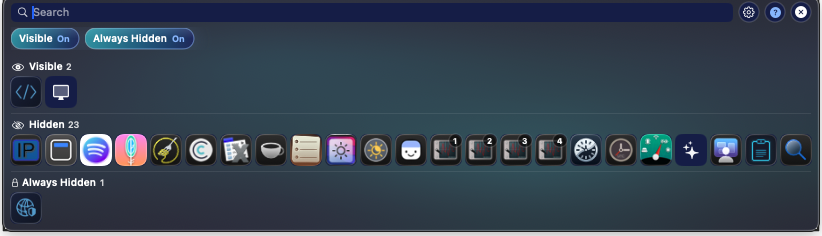
Hide icons. Show them when you need them.
One click to hide. One click to show. That's it.
Free and fully open source (MIT). Every feature unlocked. No trial, no license, no subscription.
SaneBar is community-maintained — read the full announcement.
Everything included
Free
Open source (MIT). Every feature unlocked for everyone.
Buying more than one SaneApps Mac app?
Get the Everything Bundle for $49.99 once. All current direct Mac Pro apps in one purchase.
Get the bundle See included apps →❤️ Support independent Mac software
SaneApps is a tiny, privacy-first indie shop. If our apps earn a spot on your Mac, sponsoring the developer keeps the next ones coming.
Sponsor on GitHubClick below to hide and unhide apps:
Second Menu Bar
Browse hidden apps without losing access. Drag moves between zones included, free.
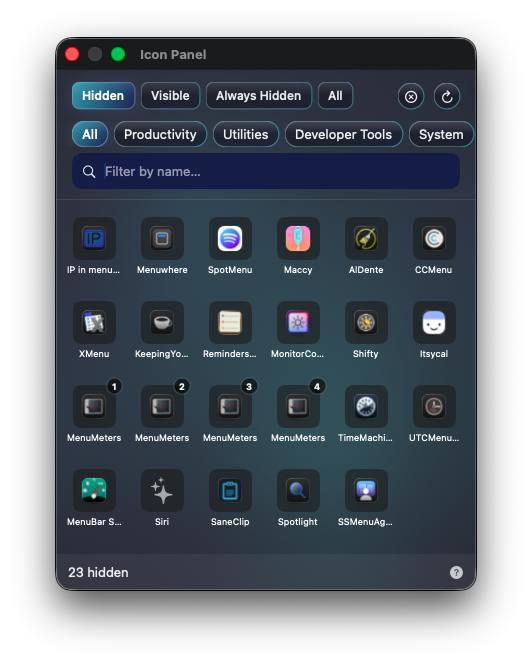
Icon Panel
Search by name, filter by section, and double-click to open any hidden app.
Settings
Use the Icon Panel or the Second Menu Bar. Switch anytime in Settings.
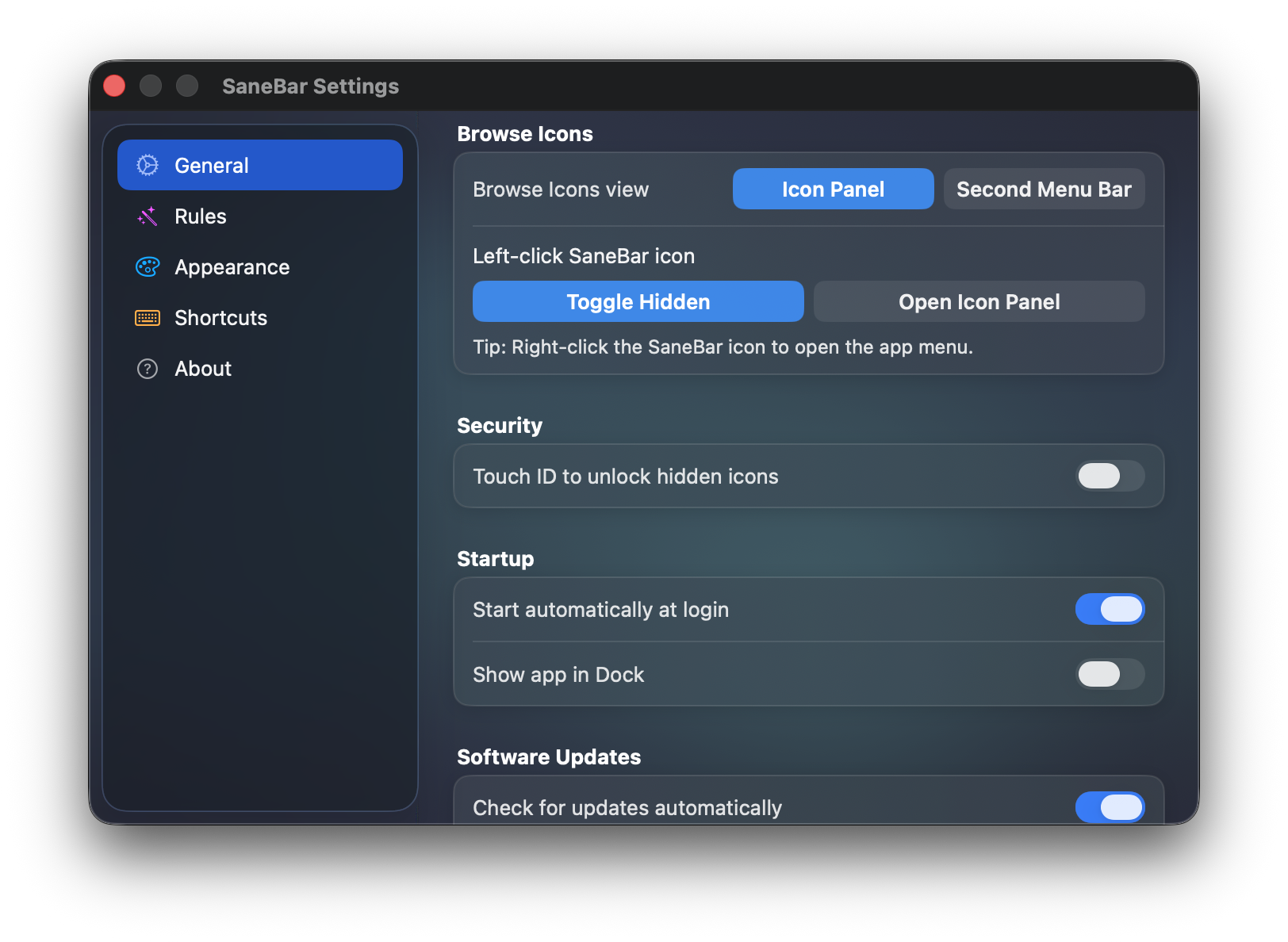
Hide clutter, browse every menu bar app, and switch between the compact panel or second menu bar.
Move noisy icons out of the real menu bar without losing access to the tools you still need.
Search, filter, and reveal icons from a focused panel built for quick cleanup.
Use the icon panel, second menu bar, Touch ID unlock, and startup options from one settings screen.
Everything below is included, free and fully open source.
Click the SaneBar icon to hide or reveal all your menu bar icons. Use ⌘\ to toggle with a keyboard shortcut.
Browse hidden icons in a floating panel or second menu bar. Click hidden icons to open them, and drag icons between zones to reorganize.
Search any menu bar app by name — even icons hidden behind the Notch. Press ⌘⇧Space to open.
Hidden icons automatically tuck away after a few seconds. No clutter, no maintenance.
When inline reveal needs room, SaneBar can temporarily hide app menus so your hidden icons still open cleanly.
The only menu bar manager with biometric security. Perfect for shared workspaces and presentations.
Click any icon from panel views to open its menu. Assign global hotkeys to your favorite apps.
A dedicated zone for icons you rarely need. Access and manage it in Icon Panel, Second Menu Bar, or Find Icon search.
Save different setups for work, home, or presentations. Organize icons into groups. Full AppleScript automation for Shortcuts and workflows.
Auto-reveal icons when Focus Mode changes, battery is low, apps launch, or you connect to certain WiFi networks.
Hover, scroll, or click to reveal. Directional scroll (up=show, down=hide). Auto-hide on app switch. Ice-compatible.
MacBook Pro notch hiding icons? System-wide spacing (1-10) gives you more room.
Liquid Glass on macOS Tahoe. Tint, shadows, borders, corners, dividers. Custom menu bar icon and spacers.
Switch in seconds. Import your icon layout from Bartender or Ice with one click. Export/import settings between Macs.
Join thousands decluttering their workspace in 2026.
"Your app is SO much better than Bartender."
"SaneBar is the first Bartender replacement that feels like it'll actually surpass the original. The speed with which you reply to issue reports and implement new features is phenomenal."
"Love the app! Moved from ICE because it was buggy, this one seems less buggy."
"For Maximum Privacy & Security: SaneBar is the unequivocal winner. Its architecture prevents data exfiltration by design."
"Checkout was perfect and the app is nicely done and getting even better. Congrats on the great work."
"Great app, I just switched from Ice. I really like its minimalism and simplicity. It just works and very well."
"That's why I love independent developers…"
"SaneBar is really quite stable and I'm not sure what else I could wish for. I love that it's actively maintained."
"I use Sanebar daily."
"I liked what I saw in the implementation in the free version."
"You already have 'Reveal when I scroll up in the menu bar' — exactly how I use Ice. I like it very much!"
"I am using it now and there are no shadow clicks as seen in other menu bar managers."
"It appears you have been very busy updating SaneBar :)"
"Damn! This looks great. I have been desperately looking for a FOSS alternative."
"🥈 Best free pick. SaneBar is a very strong runner-up with thoughtful features—power search, auto-hide triggers, hotkeys, and Touch ID locking."
"You have convinced me to become a supporter."
"Your app is SO much better than Bartender."
"SaneBar is the first Bartender replacement that feels like it'll actually surpass the original. The speed with which you reply to issue reports and implement new features is phenomenal."
"Love the app! Moved from ICE because it was buggy, this one seems less buggy."
"For Maximum Privacy & Security: SaneBar is the unequivocal winner. Its architecture prevents data exfiltration by design."
"Checkout was perfect and the app is nicely done and getting even better. Congrats on the great work."
"Great app, I just switched from Ice. I really like its minimalism and simplicity. It just works and very well."
"That's why I love independent developers…"
"SaneBar is really quite stable and I'm not sure what else I could wish for. I love that it's actively maintained."
"I use Sanebar daily."
"I liked what I saw in the implementation in the free version."
"You already have 'Reveal when I scroll up in the menu bar' — exactly how I use Ice. I like it very much!"
"I am using it now and there are no shadow clicks as seen in other menu bar managers."
"It appears you have been very busy updating SaneBar :)"
"Damn! This looks great. I have been desperately looking for a FOSS alternative."
"🥈 Best free pick. SaneBar is a very strong runner-up with thoughtful features—power search, auto-hide triggers, hotkeys, and Touch ID locking."
"You have convinced me to become a supporter."
Other menu bar apps may spy, charge forever, or disappear. SaneBar keeps your menu bar workflow on-device, publishes its code, and stays simple to own.
This table reflects SaneBar, free and fully open source. Every feature is included for everyone.
| Feature | SaneBar | Bartender | Ice | Hidden Bar | Dozer |
|---|---|---|---|---|---|
| Touch ID Lock Biometric protection for hidden icons | ✓ | ✗ | ✗ | ✗ | ✗ |
| Smart Triggers Auto-reveal on low battery, Wi-Fi, Focus, or app launch | ✓ | ✗ | ✗ | ✗ | ✗ |
| Guided Onboarding Interactive walkthrough & competitor import | ✓ | ✗ | ✗ | ✗ | ✗ |
| Import from Bartender/Ice Migrate your existing setup in one click | ✓ | ✗ | ✗ | ✗ | ✗ |
| Menu Bar Spacing Recover icons hidden by the notch | ✓ | ✗ | ✓ | ✗ | ✗ |
| Settings Export/Import Back up and restore your configuration | ✓ | ✗ | ✗ | ✗ | ✗ |
| Always-Hidden Zone Third zone for rarely-used icons | ✓ | ✗ | ✓ | ✗ | ✗ |
| Gesture Controls Scroll, hover, or click to reveal | ✓ | ✓ | ✓ | ✗ | ✗ |
| Second Menu Bar Full-width bar showing hidden icons | ✓ | ✓ | ✓ | ✗ | ✗ |
| AppleScript Automation & Shortcuts support | ✓ | ✓ | ✗ | ✗ | ✗ |
| Per-Icon Hotkeys Keyboard shortcut per app | ✓ | ✓ | ✗ | ✗ | ✗ |
| Find Icon Search Find any icon by name | ✓ | ✓ | ✓ | ✗ | ✗ |
| Icon Management Move icons between hidden/visible | ✓ | ✓ | ✓ | ✓ | ✓ |
| Privacy-First Design No user-content tracking in the app | ✓ | ✗* | ✓ | ✓ | ✓ |
| 🔍 100% Transparent Code Read every line on GitHub | ✓ | ✗ | ✓ | ✓ | ✓ |
| Actively Maintained Regular updates in 2026 | ✓ | ✓ | ✓ | ✗ | ✗ |
| Pricing One-time, no subscription | Free | $16 | Free | Free | Free |
* Bartender changed ownership in 2024 with limited transparency. It requires screen recording permissions.
Simple answers about how SaneBar works, what is included (everything), and what stays on your Mac.
SaneBar hides menu bar apps you do not need right now, keeps the important ones visible, and lets you quickly open hidden apps when you need them.
You can use it to clean up a crowded menu bar, stop icons from disappearing behind the notch, and keep your menu bar easier to use every day.
Click the SaneBar icon to reveal your hidden apps, and choose what stays visible with normal menu bar dragging.
SaneBar views also show Visible, Hidden, and Always Hidden sections so you can review your layout clearly.
Open the Icon Panel or Second Menu Bar, then double-click the app you want to open.
You can also search for an app by name and open it without hunting through a crowded menu bar.
Icon Panel is a compact floating view that is great for searching, filtering, and opening apps fast.
Second Menu Bar gives you a full-width row of hidden apps below the real menu bar, which is better when you want to see more apps at once and drag them between sections.
Yes. SaneBar is built for crowded menu bars, including Macs where apps can get pushed behind the notch or off-screen.
If an app is hard to reach in the real menu bar, SaneBar gives you another way to find it, open it, and organize it.
Everything is included. Hide and show apps, use the Icon Panel, use the Second Menu Bar, search for apps, and open hidden apps quickly.
Every advanced feature is included too, free, for everyone.
SaneBar went 100% free and open source in June 2026 — every former Pro feature is unlocked for everyone, no license key.
That includes Touch ID or password lock, the Always Hidden section, drag moves between sections, smart triggers, profiles, appearance controls, per-app shortcuts, and AppleScript automation.
SaneBar runs on-device by default. It does not upload your files or your menu bar contents.
Network activity is limited to practical things like app updates and a few simple anonymous app-health counts.
Yes. macOS requires Accessibility access for apps that organize and interact with menu bar items.
SaneBar needs that permission so it can hide apps, reveal them again, move them between sections, and open them for you.
Most Apple menu extras and normal third-party menu bar apps work well.
A small number of unusual apps use custom menu bar behavior that can make them edge cases. That is not the normal case, and I avoid risky hacks that would make the common apps less reliable just to chase a few outliers.
"The worker is worthy of his wages."
— 1 Timothy 5:18
Please support if you can.
Thank you. — Mr. Sane

3Go9nJu3dj2qaa4EAYXrTsTf5AnhcrPQke

0x026668feA51c27F0803055B8c0d881ac2F1e7C3e

FBvU83GUmwEYk3HMwZh3GBorGvrVVWSPb8VLCKeLiWZZ

t1PaQ7LSoRDVvXLaQTWmy5tKUAiKxuE9hBN
Click any address to copy
Same idea, other everyday Mac annoyances — on-device by default, pay once, no subscription.

The natural companion to a tidy menu bar: private clipboard history with Touch ID lock, instant search, and OCR. Free to try, $14.99 once.
Learn more →
Useful right-click actions in Finder — convert files, merge PDFs, run scripts — all on-device. Free to try, $14.99 once.
Learn more →
Block ads and trackers system-wide with a simple local hosts manager. No extensions, no cloud.
Learn more →SaneBar is free and fully open source (MIT). Every feature is unlocked for everyone, forever.